About Business Card Reader
ABBYY Business Card Reader -The World’s Fastest Business Card Scanner & Contact Management App for iPhone and iPad! Recommended by The New York Times, CNN, The Telegraph, Computer Business Review, Macworld. Winner of the...
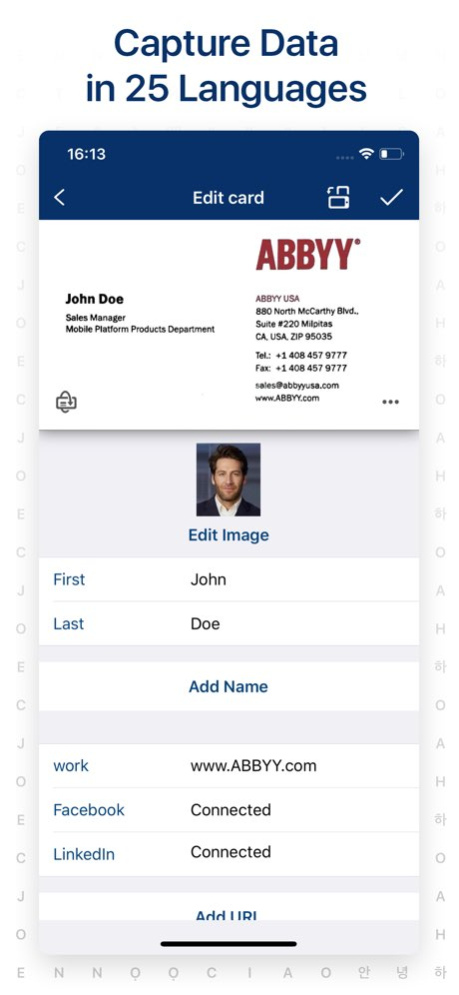
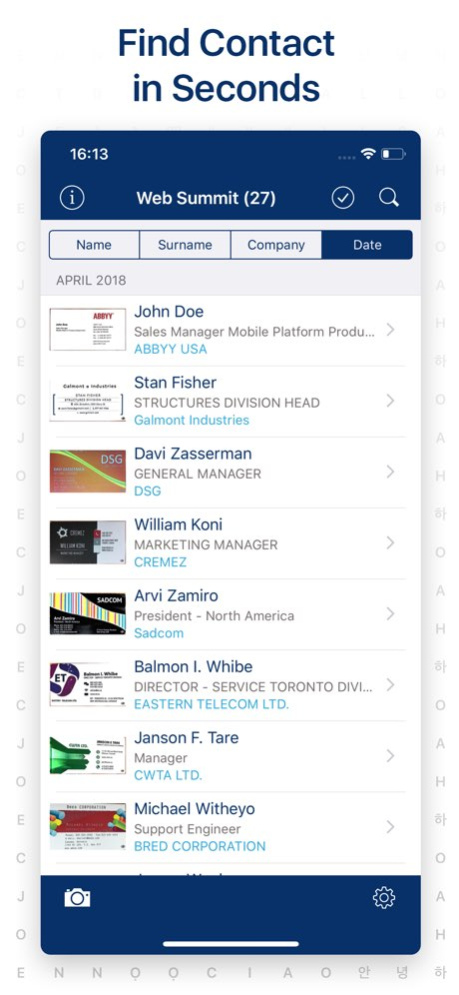
ABBYY Business Card Reader -The World’s Fastest Business Card Scanner & Contact Management App for iPhone and iPad! Recommended by The New York Times, CNN, The Telegraph, Computer Business Review, Macworld. Winner of the RISING STAR Award in the Mobile Star Awards ABBYY Business Card Reader easily & simply captures & stores contact from business cards in 25 languages to your iPhone and iPad. The recognized data can be saved in either your device contacts or the app digital storage. KEY FEATURES . QUICK AND ACCURATE SCANNING ABBYYs optical character recognition technology provides quick & accurate recognition of all contact information: names, organizations, phone numbers, e-mail addresses, etc. . AUTO-CLICK PHOTO FEATURE Automatically focuses on the business card, detects its edges, crops any extraneous background & captures an image of the card all by itself. . EASY CHECK OF RECOGNIZED DATA The app highlights “unusual” characters with blue color and displays the original image so that you can quickly confirm the output of the app. . APPLE WATCH APP. You won’t need to reach for your iPhone or iPad to remember somebody’s name. View contacts and make phone calls right from BCR on your Apple Watch! . AUTOMATIC NORMALIZATION OF PHONE AND EXTENTION NUMBERS BCR will automatically put in all the missing parts so that you can reach the contact even if the country code was omitted in print. . AUTOCOMPLETION OF ADDRESSES BCR corrects any typos and fills in the missing address fields so you can easily find it on the map. . MANUAL BACKUPS. Manual backups to archive and restore to another device. . Export contacts to Salesforce Leads (premium account required). BCR can export business cards to Enterprise, Unlimited, and Performance Editions of SF license. Professional Edition does not allow BCR export. . Set up voice commands in Siri Shortcuts app to open business cards by voicing the name of the owner. . Spotlight Search to find business cards from BCR . Export business cards to MS Excel in .CSV format. . Smart Facebook and LinkedIn search: connect social media account to the business card and auto upload photo of contact from Facebook. . Search in iPhone Maps for the address of your contacts. . Exchange digitally and forward recognized contacts via e-mail as VCard or JPEG files or via SMS as a plain text. . Share your contacts using QR code. . Support 25 languages including recognition of multilingual cards. - French - German - Greek - Japanese - Indonesian - Italian - Korean - Norwegian (both Bokmal and Nynorsk) - Polish - Portuguese (Portugal) - Portuguese (Brazil) - Russian - Spanish - Swedish - Turkish - Ukrainian The free version provides 10 card recognition. Enable Premium to get unlimited functionality: . Unlimited business card recognition . Export to Excel . No ads Premium Account auto-renewable subscription allows using all functions of this app. Subscription length periods: 1 month with 7 days free trial, and 1 year. The subscription is automatically renewed at the end of the period unless you choose to cancel the subscription at least 24-hours before the end of the current period. Payment will be charged to your iTunes Account at confirmation of purchase. You can manage your subscription and switch off the auto-renewal by accessing your Account Settings after purchase. Any unused portion of a free trial period, if offered, will be forfeited if you purchase a subscription to that publication. Read us: abbyy.com/blog/mobile Facebook.com/ABBYYsoft Twitter @ABBYY_Software YouTube.com/ABBYYvideos Privacy Policy abbyy.com/privacy Terms of Use abbyybcr.com/en/eula Looking forward to your feedback on the App Store!
Previous Versions
Here you can find the changelog of Business Card Reader since it was posted on our website on 2016-10-29 06:58:23.
The latest version is 9.8.10 and it was updated on 2026-10-07 02:01:28. See below the changes in each version.
Business Card Reader version 9.8.10
Updated At: 2026-10-06
Changes: Version History This app has been updated by Apple to prepare for watchOS 27 compatibility. No new features are included.
Bug fixes and performance improvements 9.8.10 09/18/2025 Dear users, thank you for choosing ABBYY BCR.
In this release, we've made changes to fix a few bugs and enhanced stability.
Here are the key highlights from previous releases:
+ Updates for iOS 17 support.
+ Fixed localizations for numerous countries.
+ Introduced the ability to share your contact data as a QR code.
+ Enhanced the capability to edit separate fields of recognized addresses.
+ Removed synchronization feature for scanned business cards.
If you enjoy Business Card Reader, we invite you to leave a review on the App Store. 9.8.9 05/27/2024 Dear users, thank you for choosing ABBYY BCR.
In this release, we've made changes to support iOS 17, fixed a few bugs, and enhanced stability.
Highlights from previous versions:
+ Fixed localizations for numerous countries.
+ Introduced the ability to share your contact data as a QR code.
+ Enhanced the capability to edit separate fields of recognized addresses.
+ Removed synchronization feature for scanned business cards.
If you enjoy Business Card Reader, we invite you to leave a review on the App Store. 9.8.8 11/30/2023 Dear users, thank you for choosing ABBYY BCR.
In this release, we have removed the synchronization feature for scanned business cards to ensure the safety of your data.
The most important in previous versions:
+ Fixed localizations for many countries.
+ Share your contact data as a QR-code.
+ You can now edit separate fields of recognized addresses.
If you enjoy Business Card Reader, leave a review on the App Store. 9.8.7 09/21/2023 Dear users, thank you for choosing ABBYY BCR.
In this release, we fixed a few bugs and improved stability.
The most important in previous versions:
+ Fixed localizations for many countries.
+ Ability to delete the ABBYY account with all synchronized business card data: Application Settings> ABBYY Account> Delete Account.
+ Share your contact data as a QR-code.
+ You can now edit separate fields of recognized addresses.
If you enjoy Business Card Reader, leave a review on the App Store. 9.8.6 03/13/2023 Dear users, thank you for choosing ABBYY BCR.
In this release, we fixed a few bugs and improved stability.
The most important in previous versions:
+ Fixed localizations for many countries.
+ Ability to delete the ABBYY account with all synchronized business card data: Application Settings> ABBYY Account> Delete Account.
+ Share your contact data as a QR-code.
+ You can now edit separate fields of recognized addresses.
If you enjoy Business Card Reader, leave a review on the App Store. 9.8.5 01/17/2023 Dear users, thank you for choosing ABBYY BCR.
In this release, we fixed a few bugs and improved stability.
The most important in previous versions:
+ Fixed localizations for many countries.
+ Ability to delete the ABBYY account with all synchronized business card data: Application Settings> ABBYY Account> Delete Account.
+ Share your contact data as a QR-code.
+ You can now edit separate fields of recognized addresses.
If you enjoy Business Card Reader, leave a review on the App Store. 9.8.4 11/15/2022 Dear users, thank you for choosing ABBYY BCR.
In this release, we fixed a few bugs and improved stability.
The most important in previous versions:
+ Fixed localizations for many countries.
+ Ability to delete the ABBYY account with all synchronized business card data: Application Settings> ABBYY Account> Delete Account.
+ Share your contact data as a QR-code.
+ You can now edit separate fields of recognized addresses.
If you enjoy Business Card Reader, leave a review on the App Store. 9.8.3 10/29/2022 Dear users, thank you for choosing ABBYY BCR.
+ In this release, we fixed localizations for many countries. Also, we fixed a few bugs and improved stability.
The most important in previous versions:
+ Ability to delete the ABBYY account with all synchronized business card data: Application Settings> ABBYY Account> Delete Account.
+ Share your contact data as a QR-code.
+ You can now edit separate fields of recognized addresses.
If you enjoy Business Card Reader, leave a review on the App Store. 9.8.2 05/17/2022 Dear users, thank you for choosing ABBYY BCR.
+ In this release, we fixed localizations for many countries. Also, we fixed a few bugs and improved stability.
The most important in previous versions:
+ Ability to delete the ABBYY account with all synchronized business card data: Application Settings> ABBYY Account> Delete Account.
+ Share your contact data as a QR-code.
+ You can now edit separate fields of recognized addresses.
If you enjoy Business Card Reader, leave a review on the App Store. 9.8 03/25/2022 Dear users, thank you for choosing ABBYY BCR. Wish you Merry Christmas and a Happy New 2022 Year!
In this release, we added the ability to delete the ABBYY account, including all synchronized business card data. To use it, open Application Settings> ABBYY Account> Delete Account.
The most important in previous versions:
+ Share your contact data as a QR-code.
+ You can now edit separate fields of recognized addresses.
If you enjoy Business Card Reader, leave a review on the App Store. 9.7.11 12/21/2021 + Bug fixes and stability improvements.
+ Business Card Reader is ready for iOS 15 – working stably and smoothly.
The most important in previous versions:
+ The minimum supported iOS version is 13.
If you enjoy Business Card Reader, leave a review on the App Store. 9.7.10 11/17/2021 + Business Card Reader is ready for iOS 15 – working stably and smoothly.
The most important in previous versions:
+ The minimum supported iOS version is 13.
+ Share your contact data as a QR-code.
+ You can now edit separate fields of recognized address.
If you enjoy Business Card Reader, leave a review on the App Store. 9.7.9 10/29/2021 + Bug fix and stability improvements.
The most important in previous versions:
+ The minimum supported iOS version is 13.
+ Share your contact data as a QR-code.
+ You can now edit separate fields of recognized address.
If you enjoy Business Card Reader, leave a review on the App Store. 9.7.8 09/10/2021 + The minimum supported iOS version is 13.
The most important in previous versions:
+ Share your contact data as a QR-code.
+ You can now edit separate fields of recognized address.
+ While editing address, you can see the location on the map.
If you enjoy Business Card Reader, leave a review on the App Store. 9.7.7 08/02/2021 + Stability improvements and bug fix.
The most important in previous versions:
+ Share your contact data as a QR-code.
+ You can now edit separate fields of recognized address.
+ While editing address, you can see the location on the map.
If you enjoy Business Card Reader, leave a review on the App Store. 9.7.5 04/23/2021 + Stability improvements.
The most important in previous versions:
+ Share your contact data as a QR-code.
+ You can now edit separate fields of recognized address.
+ While editing address, you can see the location on the map.
If you enjoy Business Card Reader, leave a review on the App Store. 9.7.3 01/31/2021 + Bugfix and stability improvement.
+ The minimum supported iOS is now 12.
The most important in previous versions:
+ Share your contact data as a QR-code.
+ You can now edit separate fields of recognized address.
+ While editing address, you can see the location on the map.
If you enjoy Business Card Reader, leave a review on the App Store. 9.7.2 11/05/2020 + Bugfix and stability improvement.
+ The minimum supported iOS is now 12.
The most important in previous versions:
+ Share your contact data as a QR-code.
+ You can now edit separate fields of recognized address.
+ While editing address, you can see the location on the map.
If you enjoy Business Card Reader, leave a review on the App Store. 9.7.1 09/11/2020 + Share your contact data as a QR-code. BCR will generate a QR-code with your business card. Adjust the amount of shared data by tapping More / Less data. Then just show a QR-code to share contactless.
+ You can now edit separate fields of recognized address.
+ While editing address, you can see the location on the map.
The most important in previous versions:
+ Improved stability and security of business cards synchronization.
+ Added the multiple-choice feature to Salesforce.
If you enjoy Business Card Reader, leave a review on the App Store. 9.7.0 07/29/2020 + Stability improvements and bug fixes.
The most important in previous versions:
+ Improved stability and security of business cards synchronization.
+ Added the multiple-choice feature to Salesforce.
If you enjoy Business Card Reader, please feel free to leave your review on the App Store. 9.6.3 07/21/2020 + Improved stability and security of business cards synchronization. Due to this update you’ll have to log in to your ABBYY account again, if you have turned on synchronization before.
+ Added the multiple-choice feature to Salesforce.
+ Redesigned alerts in the app to make your workflow more comfortable.
The most important in previous versions:
+ Document mode in the camera that will suggest the best way to scan the big pages.
If you enjoy Business Card Reader, please feel free to leave your review on the App Store. 9.6.1 06/02/2020 + Improved stability and security of business cards synchronization. Due to this update you’ll have to log in to your ABBYY account again, if you have turned on synchronization before.
+ Added the multiple-choice feature to Salesforce.
+ Redesigned alerts in the app to make your workflow more comfortable.
The most important in previous versions:
+ Document mode in the camera that will suggest the best way to scan the big pages.
If you enjoy Business Card Reader, please feel free to leave your review on the App Store. 9.6 05/27/2020 Salesforce login error fixed.
The most important in previous versions:
+ Document mode in the camera that will suggest the best way to scan the big pages
+ Siri Shortcuts commands for opening business cards.
If you enjoy Business Card Reader, please feel free to leave your review on the App Store. 9.5.9 04/09/2020 Salesforce login error fixed.
The most important in previous versions:
+ Document mode in the camera that will suggest the best way to scan the big pages
+ Siri Shortcuts commands for opening business cards.
If you enjoy Business Card Reader, please feel free to leave your review on the App Store. 9.5.8 02/27/2020
Business Card Reader version 9.8.10
Updated At: 2026-08-23
Changes: Version History Bug fixes and performance improvements 9.8.10 09/18/2025 Dear users, thank you for choosing ABBYY BCR.
In this release, we've made changes to fix a few bugs and enhanced stability.
Here are the key highlights from previous releases:
+ Updates for iOS 17 support.
+ Fixed localizations for numerous countries.
+ Introduced the ability to share your contact data as a QR code.
+ Enhanced the capability to edit separate fields of recognized addresses.
+ Removed synchronization feature for scanned business cards.
If you enjoy Business Card Reader, we invite you to leave a review on the App Store. 9.8.9 05/27/2024 Dear users, thank you for choosing ABBYY BCR.
In this release, we've made changes to support iOS 17, fixed a few bugs, and enhanced stability.
Highlights from previous versions:
+ Fixed localizations for numerous countries.
+ Introduced the ability to share your contact data as a QR code.
+ Enhanced the capability to edit separate fields of recognized addresses.
+ Removed synchronization feature for scanned business cards.
If you enjoy Business Card Reader, we invite you to leave a review on the App Store. 9.8.8 11/30/2023 Dear users, thank you for choosing ABBYY BCR.
In this release, we have removed the synchronization feature for scanned business cards to ensure the safety of your data.
The most important in previous versions:
+ Fixed localizations for many countries.
+ Share your contact data as a QR-code.
+ You can now edit separate fields of recognized addresses.
If you enjoy Business Card Reader, leave a review on the App Store. 9.8.7 09/21/2023 Dear users, thank you for choosing ABBYY BCR.
In this release, we fixed a few bugs and improved stability.
The most important in previous versions:
+ Fixed localizations for many countries.
+ Ability to delete the ABBYY account with all synchronized business card data: Application Settings> ABBYY Account> Delete Account.
+ Share your contact data as a QR-code.
+ You can now edit separate fields of recognized addresses.
If you enjoy Business Card Reader, leave a review on the App Store. 9.8.6 03/13/2023 Dear users, thank you for choosing ABBYY BCR.
In this release, we fixed a few bugs and improved stability.
The most important in previous versions:
+ Fixed localizations for many countries.
+ Ability to delete the ABBYY account with all synchronized business card data: Application Settings> ABBYY Account> Delete Account.
+ Share your contact data as a QR-code.
+ You can now edit separate fields of recognized addresses.
If you enjoy Business Card Reader, leave a review on the App Store. 9.8.5 01/17/2023 Dear users, thank you for choosing ABBYY BCR.
In this release, we fixed a few bugs and improved stability.
The most important in previous versions:
+ Fixed localizations for many countries.
+ Ability to delete the ABBYY account with all synchronized business card data: Application Settings> ABBYY Account> Delete Account.
+ Share your contact data as a QR-code.
+ You can now edit separate fields of recognized addresses.
If you enjoy Business Card Reader, leave a review on the App Store. 9.8.4 11/15/2022 Dear users, thank you for choosing ABBYY BCR.
In this release, we fixed a few bugs and improved stability.
The most important in previous versions:
+ Fixed localizations for many countries.
+ Ability to delete the ABBYY account with all synchronized business card data: Application Settings> ABBYY Account> Delete Account.
+ Share your contact data as a QR-code.
+ You can now edit separate fields of recognized addresses.
If you enjoy Business Card Reader, leave a review on the App Store. 9.8.3 10/29/2022 Dear users, thank you for choosing ABBYY BCR.
+ In this release, we fixed localizations for many countries. Also, we fixed a few bugs and improved stability.
The most important in previous versions:
+ Ability to delete the ABBYY account with all synchronized business card data: Application Settings> ABBYY Account> Delete Account.
+ Share your contact data as a QR-code.
+ You can now edit separate fields of recognized addresses.
If you enjoy Business Card Reader, leave a review on the App Store. 9.8.2 05/17/2022 Dear users, thank you for choosing ABBYY BCR.
+ In this release, we fixed localizations for many countries. Also, we fixed a few bugs and improved stability.
The most important in previous versions:
+ Ability to delete the ABBYY account with all synchronized business card data: Application Settings> ABBYY Account> Delete Account.
+ Share your contact data as a QR-code.
+ You can now edit separate fields of recognized addresses.
If you enjoy Business Card Reader, leave a review on the App Store. 9.8 03/25/2022 Dear users, thank you for choosing ABBYY BCR. Wish you Merry Christmas and a Happy New 2022 Year!
In this release, we added the ability to delete the ABBYY account, including all synchronized business card data. To use it, open Application Settings> ABBYY Account> Delete Account.
The most important in previous versions:
+ Share your contact data as a QR-code.
+ You can now edit separate fields of recognized addresses.
If you enjoy Business Card Reader, leave a review on the App Store. 9.7.11 12/21/2021 + Bug fixes and stability improvements.
+ Business Card Reader is ready for iOS 15 – working stably and smoothly.
The most important in previous versions:
+ The minimum supported iOS version is 13.
If you enjoy Business Card Reader, leave a review on the App Store. 9.7.10 11/17/2021 + Business Card Reader is ready for iOS 15 – working stably and smoothly.
The most important in previous versions:
+ The minimum supported iOS version is 13.
+ Share your contact data as a QR-code.
+ You can now edit separate fields of recognized address.
If you enjoy Business Card Reader, leave a review on the App Store. 9.7.9 10/29/2021 + Bug fix and stability improvements.
The most important in previous versions:
+ The minimum supported iOS version is 13.
+ Share your contact data as a QR-code.
+ You can now edit separate fields of recognized address.
If you enjoy Business Card Reader, leave a review on the App Store. 9.7.8 09/10/2021 + The minimum supported iOS version is 13.
The most important in previous versions:
+ Share your contact data as a QR-code.
+ You can now edit separate fields of recognized address.
+ While editing address, you can see the location on the map.
If you enjoy Business Card Reader, leave a review on the App Store. 9.7.7 08/02/2021 + Stability improvements and bug fix.
The most important in previous versions:
+ Share your contact data as a QR-code.
+ You can now edit separate fields of recognized address.
+ While editing address, you can see the location on the map.
If you enjoy Business Card Reader, leave a review on the App Store. 9.7.5 04/23/2021 + Stability improvements.
The most important in previous versions:
+ Share your contact data as a QR-code.
+ You can now edit separate fields of recognized address.
+ While editing address, you can see the location on the map.
If you enjoy Business Card Reader, leave a review on the App Store. 9.7.3 01/31/2021 + Bugfix and stability improvement.
+ The minimum supported iOS is now 12.
The most important in previous versions:
+ Share your contact data as a QR-code.
+ You can now edit separate fields of recognized address.
+ While editing address, you can see the location on the map.
If you enjoy Business Card Reader, leave a review on the App Store. 9.7.2 11/05/2020 + Bugfix and stability improvement.
+ The minimum supported iOS is now 12.
The most important in previous versions:
+ Share your contact data as a QR-code.
+ You can now edit separate fields of recognized address.
+ While editing address, you can see the location on the map.
If you enjoy Business Card Reader, leave a review on the App Store. 9.7.1 09/11/2020 + Share your contact data as a QR-code. BCR will generate a QR-code with your business card. Adjust the amount of shared data by tapping More / Less data. Then just show a QR-code to share contactless.
+ You can now edit separate fields of recognized address.
+ While editing address, you can see the location on the map.
The most important in previous versions:
+ Improved stability and security of business cards synchronization.
+ Added the multiple-choice feature to Salesforce.
If you enjoy Business Card Reader, leave a review on the App Store. 9.7.0 07/29/2020 + Stability improvements and bug fixes.
The most important in previous versions:
+ Improved stability and security of business cards synchronization.
+ Added the multiple-choice feature to Salesforce.
If you enjoy Business Card Reader, please feel free to leave your review on the App Store. 9.6.3 07/21/2020 + Improved stability and security of business cards synchronization. Due to this update you’ll have to log in to your ABBYY account again, if you have turned on synchronization before.
+ Added the multiple-choice feature to Salesforce.
+ Redesigned alerts in the app to make your workflow more comfortable.
The most important in previous versions:
+ Document mode in the camera that will suggest the best way to scan the big pages.
If you enjoy Business Card Reader, please feel free to leave your review on the App Store. 9.6.1 06/02/2020 + Improved stability and security of business cards synchronization. Due to this update you’ll have to log in to your ABBYY account again, if you have turned on synchronization before.
+ Added the multiple-choice feature to Salesforce.
+ Redesigned alerts in the app to make your workflow more comfortable.
The most important in previous versions:
+ Document mode in the camera that will suggest the best way to scan the big pages.
If you enjoy Business Card Reader, please feel free to leave your review on the App Store. 9.6 05/27/2020 Salesforce login error fixed.
The most important in previous versions:
+ Document mode in the camera that will suggest the best way to scan the big pages
+ Siri Shortcuts commands for opening business cards.
If you enjoy Business Card Reader, please feel free to leave your review on the App Store. 9.5.9 04/09/2020 Salesforce login error fixed.
The most important in previous versions:
+ Document mode in the camera that will suggest the best way to scan the big pages
+ Siri Shortcuts commands for opening business cards.
If you enjoy Business Card Reader, please feel free to leave your review on the App Store. 9.5.8 02/27/2020
Business Card Reader version 9.8.10
Updated At: 2025-09-18
Changes: Sep 18, 2025
Version 9.8.10
Bug fixes and performance improvements
Business Card Reader version 9.8.10
Updated At: 2025-09-18
Changes: Bug fixes and performance improvements
Business Card Reader version 9.8.9
Updated At: 2024-05-27
Changes: May 27, 2024
Version 9.8.9
Dear users, thank you for choosing ABBYY BCR.
In this release, we've made changes to fix a few bugs and enhanced stability.
Here are the key highlights from previous releases:
+ Updates for iOS 17 support.
+ Fixed localizations for numerous countries.
+ Introduced the ability to share your contact data as a QR code.
+ Enhanced the capability to edit separate fields of recognized addresses.
+ Removed synchronization feature for scanned business cards.
If you enjoy Business Card Reader, we invite you to leave a review on the App Store.
Business Card Reader version 9.8.8
Updated At: 2023-11-30
Changes: Nov 30, 2023
Version 9.8.8
Dear users, thank you for choosing ABBYY BCR.
In this release, we've made changes to support iOS 17, fixed a few bugs, and enhanced stability.
Highlights from previous versions:
+ Fixed localizations for numerous countries.
+ Introduced the ability to share your contact data as a QR code.
+ Enhanced the capability to edit separate fields of recognized addresses.
+ Removed synchronization feature for scanned business cards.
If you enjoy Business Card Reader, we invite you to leave a review on the App Store.
Business Card Reader version 9.8.7
Updated At: 2023-09-21
Changes: Sep 21, 2023
Version 9.8.7
Dear users, thank you for choosing ABBYY BCR.
In this release, we have removed the synchronization feature for scanned business cards to ensure the safety of your data.
The most important in previous versions:
+ Fixed localizations for many countries.
+ Share your contact data as a QR-code.
+ You can now edit separate fields of recognized addresses.
If you enjoy Business Card Reader, leave a review on the App Store.
Business Card Reader version 9.8.6
Updated At: 2023-03-13
Changes: Mar 13, 2023
Version 9.8.6
Dear users, thank you for choosing ABBYY BCR.
In this release, we fixed a few bugs and improved stability.
The most important in previous versions:
+ Fixed localizations for many countries.
+ Ability to delete the ABBYY account with all synchronized business card data: Application Settings> ABBYY Account> Delete Account.
+ Share your contact data as a QR-code.
+ You can now edit separate fields of recognized addresses.
If you enjoy Business Card Reader, leave a review on the App Store.
Business Card Reader version 8.30.1
Updated At: 2014-09-23
Disclaimer
Official App Store Link
We do not host Business Card Reader on our servers. We did not scan it for viruses, adware, spyware or other type of malware. This app is hosted by Apple and passed their terms and conditions to be listed there. We recommend caution when installing it.
The App Store link for Business Card Reader is provided to you by apps112.com without any warranties, representations or guarantees of any kind, so access it at your own risk.
If you have questions regarding this particular app contact the publisher directly. For questions about the functionalities of apps112.com contact us.